Open an Eclipse project in Eclipse
Wednesday, 6th July, 2011
What could be simpler? Not.
I am developing an Android project using Eclipse. I’m working on several machines, with the project source kept in version control. Eclipse seems to generate a ton of metadata files. So far I haven’t been keeping these under version control, but it looks like I might have to.
Often when I launch Eclipse it doesn’t find the project. To gently remind Eclipse where your project is:
- Choose File | Import
- Select General | Existing Projects into Workspace
- Click next and then browse to the directory contain the project directory.
(source)
Eclipse mitigates the pain of having to write Java, but Eclipse brings pains of its own. Today I’m looking into developing for Android using my usual IDE, emacs.
tsung, django, and cross-site request forgery protection
Wednesday, 22nd June, 2011
Tsung is an excellent tool for stress-testing websites. With tsung-recorder you can record different visits (called sessions) to the target website, and later run many randomised versions of the visits.
One complication with testing a Django website, is that forms are generally protected against cross-site request forgery attacks by a hidden field in the form (see Cross Site Request Forgery protection).
Thanks to help from a respondent on django-users, we can overcome this complication: using dyn_variable, tsung can find values in a requested webpage and store them for use in later requests. The simplified session config below shows this in action.
<session name='login_with_csrf' probability='100' type='ts_http'> <request> <dyn_variable name="csrfmiddlewaretoken" ></dyn_variable> <http url='http://mysite.com/' method='GET'></http> </request> <request subst="true"> <http url='/home/' contents='csrfmiddlewaretoken=%%_csrfmiddlewaretoken%%&csrfmiddlewaretoken=%%_csrfmiddlewaretoken%%&username=xxxxxx&password=xxxxxx&next=%2F' content_type='application/x-www-form-urlencoded' method='POST'></http> </request> </session>
BeatBullying’s campaign The Big March collects awards
Friday, 17th June, 2011
[updated 061111: added another award]
[updated 290911: added another award]
Congratulations to BeatBullying! Six awards — so far.
MAAW Globe Awards
MAAW = Marketing Agencies Association Worldwide
Third Sector Excellence Awards
Institute of Promotional Marketing
- Digital Promotions (Gold)
- Not for Profit (Silver)
UTalk Marketing
For more on the Big March:
- The Big March itself
- BeatBullying’s page about the campaign
I was the main server-side developer for the campaign, weaving together technologies including Google’s App Engine, Django (non-rel), gaem, nginx, and Crisp‘s community management platform.
iScheme, with little iPhone, something beginning with (
Friday, 27th May, 2011
I bought iScheme a while ago, purely for the novelty value, and thought little more of it. The other day I was browsing through The Little Schemer with my son, and we came across an exercise to write a function that adds two numbers, using only operations for add 1, subtract 1, and a test for zero (p. 60).
After taking some time to express our mind-bogglement, we decided that the problem would become more accessible if we thought of the two numbers to be added as two piles of coins, and the operations as “take a coin”, “put a coin”, and “is this pile empty?”
Later that night I couldn’t resist trying it out on my phone:
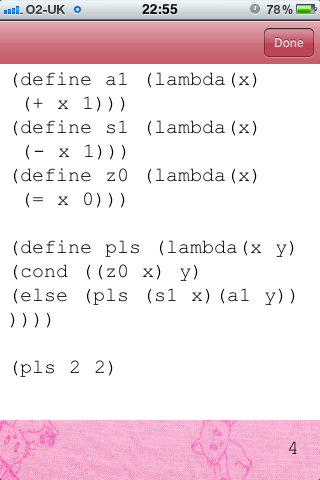
iScheme: this little schemer is a perfect companion to The Little Schemer!
I scheme, you scheme, we all scheme on iScheme!
etc.
Immodest as it sounds, I have to say I prefer my implementation to the one in the book (reformatted for exposition):
; my version
; (define pls (lambda (x y)
; (cond ((z0 x) y)
; (else (pls (s1 x)(a1 y))
; ))))

; book version
(define pls (lamdba (x y)
(cond ((z0 y) x)
(else (a1 (pls x (s1 y)))
))))
Why is the book’s version better?
Browsing error logs on a remote node
Wednesday, 18th May, 2011
First, set up your sasl
This config sets up a directory for rolling logs (max ten files, each max 10 megabytes). More configs on the man page.
% erl_config.config
[
 {sasl, [
         {sasl_error_logger, false},
         {error_logger_mf_dir, "/path/to/a/dir/for/erl/logs/"},
         {error_logger_mf_maxbytes, 10485760},  % 10 MB
         {error_logger_mf_maxfiles, 10}
         ]
  }
].
And when you run erlang, tell it where your config file is:
erl -config /path/to/erl_config -boot start_sasl ... more args ...
n.b.:
- erlang expects the config file to have the extension .config, which you don’t give in the command line.
- the above config is cribbed from Programming Erlang. I was surprised to find that Erlang and OTP in Action does not describe how to configure the sasl error logger.
Connect and browse
Once you’re connected to the above node (see Connecting erlang nodes), you can run rb, the report browser. A little bit of set up is required. See this discussion on stackoverflow, which encapsulates the setup in a function:
%% @doc Start the report browser and reset its group-leader.
%% For use in a remote shell
start_remote_rb() ->
    {ok, Pid} = rb:start(),
    true = erlang:group_leader(erlang:group_leader(), Pid),
    ok.
Connecting erlang nodes
Tuesday, 17th May, 2011
In order to connect to each other, erlang nodes each need a name, they need to share a secret cookie, and if they’re to communicate over the internet, they need access to ports.
The secret cookie can be either set at runtime (as in the examples below), or in each user’s .erlang.cookie file.
For local connection
On the same machine or subnet, each node just needs a short name:
$ erl -sname chico -setcookie marx
...
(chico@localhost)1>
For internet connection
Each node must have the following ports available:
- port 4369, used by epmd (the Erlang Port Mapper Daemon, not Erick and Parrish Making Dollars), must be open for both TCP and UDP (n.b.: this is a default).
- another port or range of ports for the erlang nodes themselves. These nodes can be set at run time using the -kernel, inet_dist_listen_min and inet_dist_listen_max flags.
Each node must also use a full name, with either a domain or an IP address:
$ erl  -name chico@brothers.org  -setcookie longrandomstring  -kernel inet_dist_listen_min 9000  inet_dist_listen_max 9005
(chico@brothers.org)1>
Connecting
Erlang nodes are gregarious: as soon as nodes find out about each other, they connect. An easy way to say hello is “ping”:
(chico@localhost)1> nodes().
[]
(chico@localhost)2> net_adm:ping(groucho@localhost).
pong
(chico@localhost)3> nodes().
[groucho@localhost]
(chico@localhost)4> ^g
User switch command
 --> r groucho@localhost
 --> c
Eshell V5.7.2  (abort with ^G)
(groucho@localhost)1>
You can skip the connection palaver by using the -remsh flag at startup:
$ erl -sname chico -setcookie marx -remsh groucho@localhost
...
(groucho@localhost)1>
etc
Introspection GUIs like AppMon and Pman can access any connected node (see the Nodes menu in the toolbar).
DragonFly BSD: copying the image onto a USB stick under MacOS X
Friday, 6th May, 2011
On Unix-like systems low-level byte-to-byte copying is done with dd:
dd if=[input file] of=[output location]
n.b.: of is a location, not a filename, so you can’t use the file path to your USB stick, as in:
dd if=dfly-i386-gui-2.10.1_REL.img of=/Volumes/MyUSBStick
The path to the device location is required, as in:
dd if=dfly-i386-gui-2.10.1_REL.img of=/dev/disk1
On MacOSX, how to find out the dev name of your USB port is described in this Ubuntu help page. The following will list the currently mounted devices, with their dev names:
$ diskutil list
This will unmount the device, ready for dd:
$ diskutil unmountDisk /dev/[name]
And this will do the deed:
$ dd if=/path/to/input/image of=/dev/[name] bs=2048
Finally, this will make your device safe for removal.
$ diskutil eject /dev/
A screen cheat sheet
Sunday, 30th January, 2011
I’ve recently been using screen quite a lot when working on a client’s servers. I like it. However, my fingers haven’t yet learnt the default key-bindings for the commands I use. In an attempt to speed that learning, here’s a list of them (copied and pasted from the manual page).
| Keys | Command | Description |
|---|---|---|
| C-a c | screen | Create a new window with a shell and switch to that window. |
| C-a A | title | Allow the user to enter a title for the current window. |
| C-a N | number | Show the number (and title) of the current window. |
C-a ' |
select | Prompt for a window identifier and switch. |
C-a " |
windowlist -b | Present a list of all windows for selection. |
| C-a k | kill | Destroy the current window. |
| C-a ? | help | Show key bindings. |
wave.erl: an erlang script to read and write .wav files
Tuesday, 1st June, 2010
Please find below wave.erl, an erlang script for reading and writing .wav audio files. I am releasing it under the ISC license.
The script exports functions read/1, write/3 and write/2, and the wave record:
Using lists:map/2 with a named function
Tuesday, 11th May, 2010
When using a named function (i.e., rather than an anonymous function) with lists:map/2, it is necessary to use the form fun module:function/arity. For example, the module [1] will raise the error [2]:
[1]
-module(maptest).
-export([test/0]).
-export([double/1]).

double(N) ->
    2 * N.

test() ->
    List = [1,2,3,4,5],
    lists:map(double, List).
[2]
1> c(maptest).
{ok,maptest}
2> maptest:test().
** exception error: bad function double
     in function  lists:map/2
Module [3] works:
[3]
-module(maptest).
-export([test/0]).
%%  -export([double/1]).  %% not necessary

double(N) ->
    2 * N.

test() ->
    List = [1,2,3,4,5],
    lists:map(fun double/1, List).
[4]
1> c(maptest).
{ok,maptest}
2> maptest:test().
[2,4,6,8,10]
So the first argument of map — whether the function is named or anonymous — always starts with the keyword fun:
[5]
lists:map(fun(X) -> 2 * X end, List).
As an aside, it is not necessary to export the function in order to make it accessible to map (cf. [3]).
This is a summary of recent discussion on the erlang-programming-book Google group.
 Llaisdy